Juicy Design in Asterble - Space
One of the main reasons I wanted to rewrite Asterble was so I could practice juicy design. If you've never heard of "juicy design", you should probably check out this video on YouTube.
The idea is to make the game feel great beyond just it's usual game mechanics; it will enhance the gameplay experience. Asterble is a pretty simple game by itself – it's more or less just a clone of the popular retro game Asteroids combined with some gameplay elements from Bubble Tanks, a popular flash game, so I have a lot of time to add in juicy details. So far, I've mainly worked on the UI and the back end. Don't worry, I didn't forget about the gameplay, but here I'll talk about a few of the changes I made to the main menu to make it feel more spacious.
First, I need to talk about why I need to make the game feel so spacious. This is one of the emotions I want someone to feel when they play my game, because I want to make the game feel relaxing. Meditative. Like you have space to... breathe. The main menu is one of the first things a player sees when they play the game, so this is the best opportunity to give them an impression of what the game is like before they even start playing.
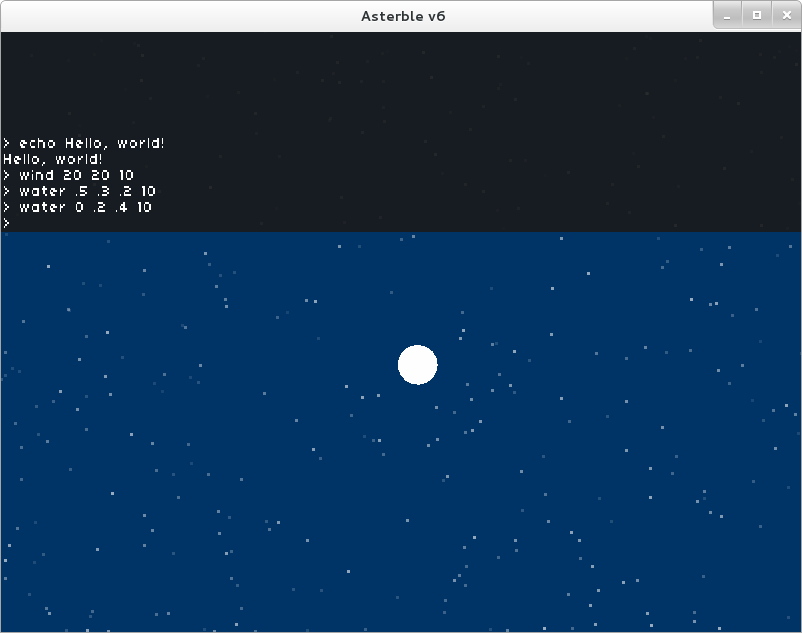
To make a lot of the effects I'm about to talk about happen, I used a console system that I wrote from another game project that I'm working on. This allows me to manually execute commands whenever I want, and it also allows more flexibility with what the program can do since a command can be executed from anywhere in the program's code. With this console, I can change, for example, the color of the background on a whim.
Changing the background is nice because then I can make the instructions screen feel like a different place. The background gets darker as you transition from the main screen over to the instructions, making it feel like a much different place in the game... but not really. The particles in the background haven't moved so it feels like I just turned off the lights.
So, I added wind. Wind is used to move entities around in the game and thus create the perception of movement. On the menu screen, when you click to open up the instructions, the particles in the background move along in the same direction with the UI. Now it feels like we moved.
Then, I added parallax to the mix. I figured that not all particles should be affected by the wind in the same way, so now their alpha values are used to decide how much they are effected. Farther away particles have a lower alpha value in their color causing them to be more transparent and should be affected less by wind and hence move less. Likewise, closer particles with higher alpha values are affected more by wind and hence move more. This is pretty easy to implement as I just multiply the wind velocity by the alpha value before adding it to the entity's current speed.
Now, when you move from the menu screen to the instructions screen, the parallax combined with the movement of the UI and particles allows the person playing the game to get a sense of space immediately. This is great, because I want the game to feel peaceful, breathtaking, and roomy. It's hard to make the game not feel cramped when the player is confined to a virtual 2D space of just 800 by 600 pixels. This combined effect of wind and parallax can be used again later, during the game, to create the feeling of movement, to make it feel like we're going places rather than staying in one spot.
You can find a temporary build of this game that
you can see in your browser here if you
want to mess around with it for the next couple of
days. Open the console by pressing the grave button
(might not work on Mac). I'm finishing this game in
February instead of January for One Game a Month; my
January game will instead be from Global Game
Jam.